
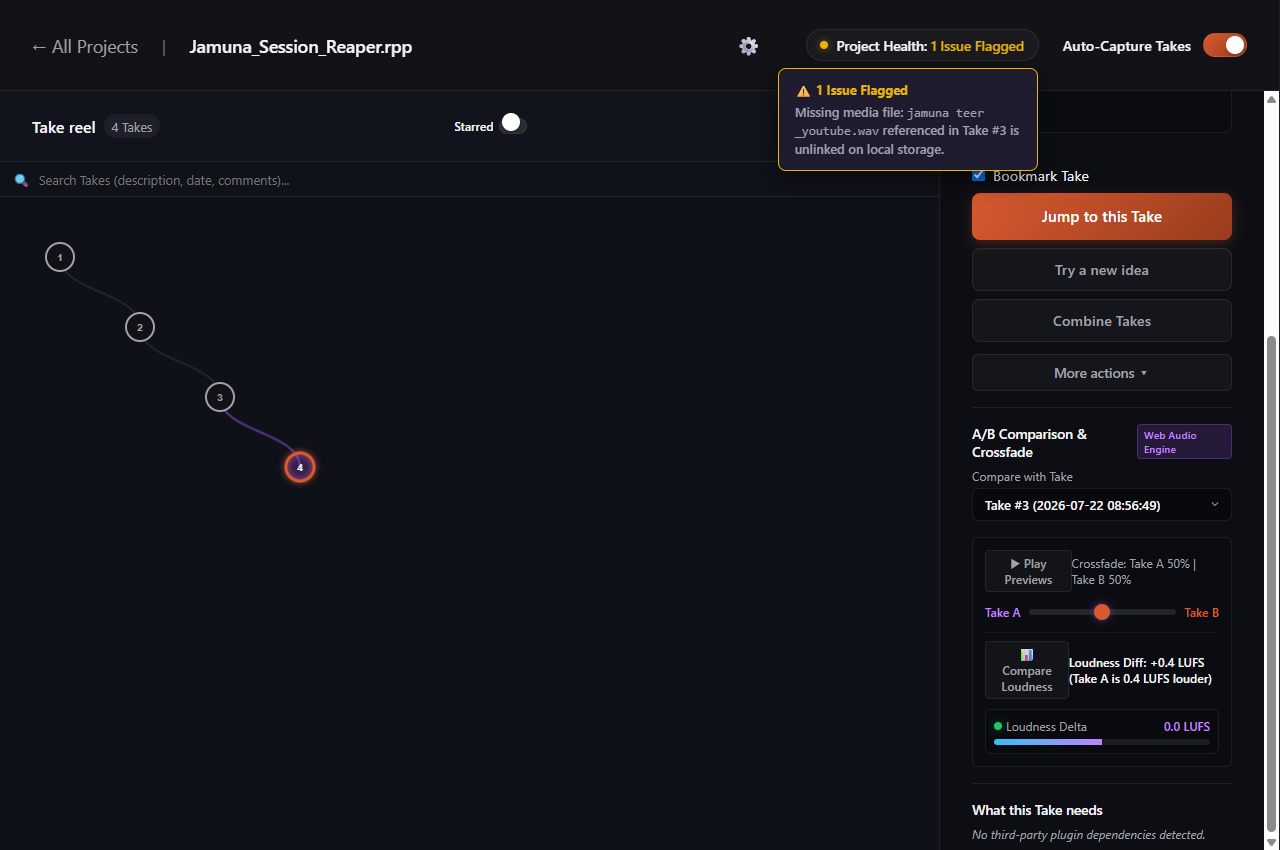
Avoid the Missing Media Surprise
There is nothing worse than opening a big session in front of an artist or client only to see red missing file dialogs popping up across your screen. Samples moved to another drive, unlinked vocal takes, or misplaced sound effects can derail a session before it even gets started. Sabes Pro scans your session assets in the background so you know your project is intact before you hit play.
What Sabes Pro Checks in Your Project
- Audio File Links: Checks that every recorded vocal, instrument track, and bounced stem referenced in your session exists physically on your disk.
- Plugin Dependencies: Catalogs third-party virtual instruments and audio effects used in your project so you can easily spot if a secondary studio laptop or collaborator is missing an essential plugin.
- Save Integrity: Watches for partial or damaged project saves so you know right away if a session failed to save properly before closing your DAW.
How Plugin Tracking Works by DAW
Because each digital audio workstation stores session data differently, Sabes Pro adapts its scanning approach to match:
- FL Studio and Cockos REAPER: Reads full plugin insert chains directly from your project saves and lists every third-party instrument and effect in your Take inspector.
- Ableton Live: Reads track counts and session tempo, with deeper instrument device indexing actively under development.
- Pro Tools, Cubase, and Nuendo: Focuses on tracking save events, session versions, and audio media paths to keep your files safe and organized.